How to use the RayOcular fundus view
This page was made for the PTCOG64 in Deauville, June 2026. Check the overview of all MReye presentations here.
Input
To correctly integrate fundus photographs in RayOcular’s fundus view, you need these parameters:
Camera view settings
- $FOV\ [\mathrm{deg}]$: field of view configured in RayOcular. We recommend starting with a value of 60 deg.
- $FS\ [\mathrm{cm}]$: film size configured in RayOcular. Set this to 1 cm to get an intuitive relation between angles and distances.
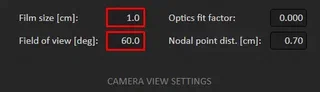
If you cannot find these parameters, make sure you set the View mode to Camera.
Biometry parameters
- $NP\ [\mathrm{cm}]$: Location of the second nodal point, posterior to the cornea apex. This parameter is patient-specific and can be calculated from biometrical measurements using e.g. Visisipy.
- $AL\ [\mathrm{cm}]$: Axial length of the eye, measured from the cornea apex to the retina.
Fundus photograph parameters
$W_{px}\ [\mathrm{px}]$: The width of the photograph in pixels. RayOcular assumes fundus photographs are always 7.68 cm wide.
$S_{photo}\ [\mathrm{px/deg}]$: Scale of the fundus photograph in pixels per degree. This parameter is used to map locations on the fundus photograph to eccentricities (or ray angles).
How to determine $\ S_{photo}$
The pixel-to-angle scaling factor can be determined in two ways:
Directly using a phantom based on an $f-\theta$ lens.
Using the central magnification ($M [\mathrm{px/mm}]$) calculated with PAROS. The scale $S_{photo}$ can be calculated from the magnification using this equation:
$$S_{photo}\ [\mathrm{px/deg}]= \frac{ M\ [\mathrm{px/mm}] }{ \arctan \frac{ 0.1\ [\mathrm{cm}] }{ AL - NP\ [\mathrm{cm}] } } \cdot 1\ [\mathrm{mm}]$$
ImportantThis parameter depends on the camera type and may depend on the refractive error of the eye.
Eye model parameters
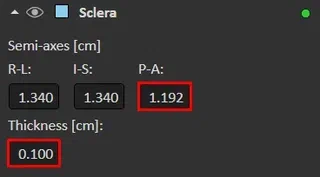
- $R_{sclera,AP}\ [\mathrm{cm}]$: The anterior-posterior radius of the sclera in RayOcular’s eye model.
- $T_{sclera}\ [\mathrm{cm}]$: The thickness of the sclera in RayOcular’s eye model.
Calculations
Using these parameters, you can calculate the fundus photograph scaling that should be entered in RayOcular:
$$scaling\ [\mathrm{-}] = \frac{ W_{px}\ [\mathrm{px}] }{ S_{photo}\ [\mathrm{px/deg}] \cdot \frac{ FOV\ [\mathrm{deg}] }{ FS\ [\mathrm{cm}] } \cdot 7.68 \ [\mathrm{cm}]}$$Furthermore, RayOcular uses a different definition of the second nodal point location. The nodal point location that should be entered in RayOcular ($NP_{RO}$) can be calculated with
$$NP_{RO} = NP + (2 * R_{sclera,AP} - AL) + T_{sclera}$$You can now use these values to configure the fundus view:
- Enter $scaling$ under
Photo alignment > Scaling - Enter $NP_{RO}$ under
Camera view settings > Nodal point dist. [cm] - Set
Camera view settings > Optics fit factorto 0.0.
